Percentage Change — When to Use Increase vs Decrease vs Overall Change
The Confusion It Resolves
You have two numbers: a value went from 50 to 75. Is that a 50% increase? A 33% decrease from the reverse perspective? 25 percentage points? All three answers are correct depending on which calculation you mean. The problem isn't the arithmetic — division and multiplication are easy. The problem is picking the right formula for the story you're trying to tell, and not mixing up the three modes. A dedicated calculator separates them clearly so you use the right lens for each situation.
The Real Problem
A company reports that revenue increased from $1 million to $1.5 million. The CEO says "50% growth." The board member asks "but what's the compound annual growth rate?" The analyst says "it's a 33% increase in margin." They're all using different reference points. The CEO is using the original value as the base. The analyst is using the final value as the base. The board member is adding a time dimension. All of them are right within their own context, but mixing them up produces misleading numbers.
The same confusion happens when talking about stock prices. A stock drops from $100 to $80 — that's a 20% decrease. Then it rises from $80 back to $100 — that's a 25% increase. The percentages are different even though the absolute change is the same $20. This asymmetry trips up investors who think "it dropped 20%, so it only needs to go up 20% to break even." The percentage change calculator makes this visible immediately.
How the Calculator Works
Open the percentage change calculator. Enter the original value and the new value. The tool shows the result in three modes: percentage increase (using original as base), percentage decrease (using original as base, showing negative change), and the absolute percentage difference. Each mode is clearly labeled so you grab the right number for your report.
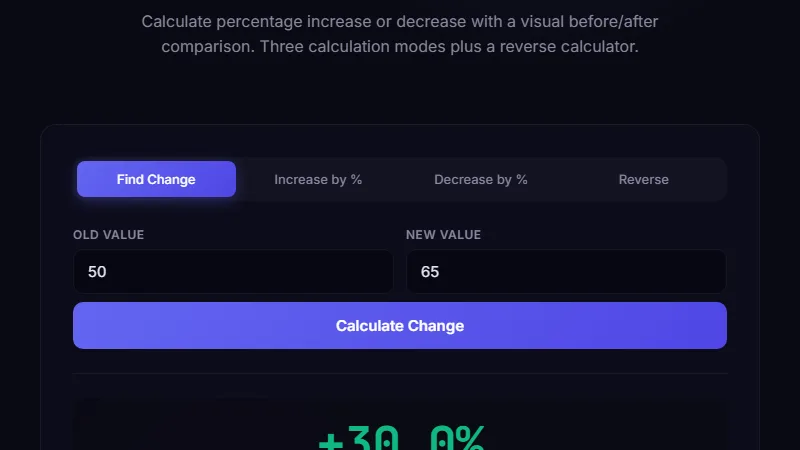
The calculator also shows the absolute difference (the raw change in units) and the percentage point change if you're working with percentages. For financial reporting, you might say "revenue increased by 20%" (relative change) while a politician might say "the tax rate went from 20% to 25%, a 5 percentage point increase" (absolute difference of percentages). Both are correct but they communicate different things.
Percentage increase: (350 - 200) / 200 x 100 = 75% increase.
Percentage decrease (from 350 to 200): (200 - 350) / 350 x 100 = -42.86% change.
Absolute percentage difference: (350 - 200) / ((350 + 200)/2) x 100 = 54.55%.
Which one to use depends entirely on what you're measuring and who you're reporting to.
Tracking Sales Performance Month Over Month
This is where most percentage change mistakes happen. January sales: $10,000. February sales: $15,000. That's a 50% increase — great. March sales: $12,000. From February to March, that's a 20% decrease. But from January to March, it's a 20% increase overall. A sales manager who reports March as "down 20% from February" sounds alarming. One who reports "up 20% from January" sounds fine. Both are true.
The calculator helps by showing all three views simultaneously. You can check each reporting period against the previous period (sequential change) or against a baseline month (base change). The tool's flexibility means you don't accidentally report the wrong comparison. The best practice is to always name your base period explicitly: "up 50% compared to January" not just "up 50%."
Measuring Investment Returns Accurately
An investor buys a stock at $50. It rises to $80 (60% gain). Then it drops to $60 (25% loss from peak). The overall gain from $50 to $60 is 20%. A common mistake is to add the percentages: 60% gain + (-25% loss) = 35% gain — which is wrong. Percentage changes don't add. The calculator shows the cumulative effect: a 60% gain followed by a 25% loss results in a net 20% gain, not 35%. This is because the 25% loss applies to the larger $80 value, not the original $50.
For multi-period calculations, the tool includes a cumulative change mode. Enter all the intermediate values and it computes the total percentage change from the first to the last value, avoiding the summing-percentages trap.
Limitations
The calculator shows percentage changes based on the numbers you enter. It doesn't adjust for inflation, currency conversion, or seasonality. A 10% sales increase during the holiday season might actually represent a decline after seasonal adjustment. For that, you need to normalize the data outside the tool.
The tool also can't handle negative values well in all modes. Going from -10 to -5 is technically a 50% increase, but semantically it's a loss reduction. The percentage formula works mathematically but the result can be misleading. For negative-to-positive transitions, the percentage change is undefined (you can't divide by zero or by a negative base and get a meaningful percentage). The tool flags these cases.
FAQ
What's the difference between percentage change and percentage points?
Percentage change is relative: an interest rate going from 5% to 10% is a 100% increase. Percentage points are absolute: the same change is a 5 percentage point increase. The tool shows both. In financial reporting, use percentage points for rates and percentage change for quantities.
Which formula should I use for reporting growth?
Use the percentage increase formula with the earlier time period as the base. This is the standard for revenue, user growth, and most business metrics. The formula is ((new - old) / old) x 100. A positive result means growth.
How do I calculate a percentage decrease?
Same formula as increase: ((new - old) / old) x 100. If the result is negative, it's a decrease. The tool shows it as "-X%" so you don't need to flip the formula manually.
What if the original value is zero?
Percentage change from zero is undefined — you can't divide by zero. The tool shows "infinity" or "undefined" in this case. Instead of reporting a percentage, report the absolute change: "from 0 to 50, an increase of 50 units."
Is year-over-year change the same as percentage change?
Year-over-year (YoY) is a specific application of percentage change where the base period is the same period one year earlier. The calculation is the same: ((this year - last year) / last year) x 100. YoY is preferred over month-over-month because it eliminates seasonal effects.
Conclusion
Use the percentage change calculator whenever you need to report a change between two values and you want to be precise about which base you're using. It's most valuable when you need all three views — increase, decrease, and absolute difference — to choose the most appropriate framing for your audience.
Don't use it for time-series analysis across multiple periods (use CAGR instead), for inflation-adjusted comparisons, or when the base value is zero or negative. For compound growth calculations over time, the compound interest calculator or the simple interest calculator are better tools.
? Back to Blog