URL Encoding Explained — Why Spaces Become %20 and How Decoding Works
The Problem It Solves
URLs have a strict character set. Letters, digits, and a few special characters (-, _, ., ~) are safe. Everything else — spaces, quotes, ampersands, plus signs, non-ASCII characters — either breaks the URL or changes its meaning. A space in a URL is technically invalid. An ampersand (&) starts a new query parameter. A hash (#) begins a fragment identifier. URL encoding (also called percent-encoding) replaces every unsafe character with a % followed by its two-digit hex code. A space becomes %20. An ampersand becomes %26. A Chinese character like 中 becomes %E4%B8%AD. The URL encoder decoder handles all of this instantly, in both directions.
The Real Problem
Every web developer has seen a broken URL. A user pastes "https://example.com/search?q=cats & dogs" and the server only sees "cats " because the & starts a new parameter. A CMS generates a link with a title like "What's New?" and the apostrophe or question mark causes a parsing error. A mobile app sends a search query with emoji and the backend crashes because it doesn't expect UTF-8 percent-encoded bytes. These bugs are subtle, intermittent, and hard to debug because the URL looks fine in the browser's address bar (browsers automatically encode and decode for display). The actual HTTP request sent to the server contains the raw percent-encoded version.
The second dimension is batch processing. A developer migrating a legacy system might have thousands of URLs in a database that need encoding or decoding. Manually fixing each one is impossible. The tool's batch mode lets you paste multiple lines and process them all at once. Each line is independently encoded or decoded, and the result is ready to paste back into your database or configuration file. This is also useful for processing log files where URLs have been double-encoded or inconsistently encoded.
How the Tool Works
Open the URL encoder decoder. You'll see two panels: plain text input and encoded output. Type or paste text in the left panel and the encoded version appears instantly on the right. Switch to decode mode and paste percent-encoded strings on the right to see the decoded plain text on the left. The tool supports batch mode — paste multiple lines, and each line is processed independently. A handy conversion table below the main interface shows the most common percent-encoded characters so you can learn the patterns: space = %20, exclamation = %21, quote = %22, hash = %23, dollar = %24, percent = %25, ampersand = %26, plus = %2B, comma = %2C, forward slash = %2F, colon = %3A, semicolon = %3B, equals = %3D, question mark = %3F, at sign = %40. Each encoding follows RFC 3986, the current standard for URI syntax.
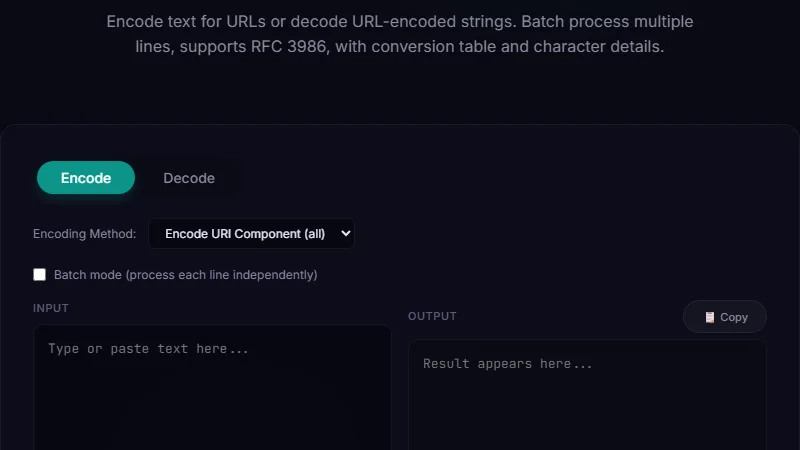
Input: What is URL encoding? (with special chars: & $ #)
Output: What%20is%20URL%20encoding%3F%20(with%20special%20chars%3A%20%26%20%24%20%23)
Decode back: Paste the output and click Decode → returns the original text.
Note how the ? became %3F, & became %26, $ became %24, and # became %23. Spaces all became %20. The tool shows each character's encoding side by side in the reference table.
Cleaning Up User-Generated Search Queries
A developer building a search feature takes user input and puts it directly into a URL: /search?q=user input. The first user types "coffee & tea" and the URL breaks — the server sees two parameters: q=coffee and tea= (empty value). The fix is to encode the user input before constructing the URL: /search?q=coffee%20%26%20tea. The tool helps developers debug this pattern: paste the user's raw input, copy the encoded version, and use it in your URL construction. For JavaScript developers, the built-in encodeURIComponent() does the same thing, but the tool is useful for testing: you can see exactly what encodeURIComponent produces for any string and compare it with manual encoding. This is especially important for non-ASCII characters and emoji, where different environments might produce different encodings. For example, the emoji 🔗 encodes to %F0%9F%94%97 in UTF-8. If your backend expects a different encoding (like UTF-7 or ISO-8859-1), the round-trip will fail. The tool lets you verify that your encode/decode pipeline is consistent.
Decoding Obfuscated URLs in Security Analysis
Security researchers and system administrators often encounter encoded URLs in logs, emails, and threat reports. Phishing links frequently use double encoding or mixed encoding to bypass filters. A URL like https://evil.com%2F%2Fgood.com might look like it points to good.com but actually decodes to https://evil.com//good.com. The tool's decode mode reveals the real destination. Security teams use it to analyze suspicious links before clicking: paste the encoded URL, decode it, and inspect the actual hostname and path. The batch mode is useful here — paste a list of encoded URLs from a log file and decode them all at once to identify patterns. The tool also catches common tricks like encoding the same character multiple times (e.g., %252F decodes to %2F which decodes to /). A single decode pass shows you one level. If the result still contains percent signs, decode again to peel the next layer.
Limitations
The tool follows RFC 3986 percent-encoding rules. Some legacy systems use alternative encoding schemes (like UTF-7 or ISO-8859-1) that produce different percent-encoded bytes for the same characters. The tool assumes UTF-8, which is the modern standard. The tool encodes all non-reserved characters by default. Some applications require leaving certain characters (like / or :) unencoded in specific contexts — you'll need to handle those exceptions manually. The batch mode processes each line independently but does not concatenate or transform lines. Very large batches (thousands of lines) may cause browser performance issues. The tool operates entirely client-side, meaning sensitive URLs never leave your browser.
FAQ
Why is a space encoded as %20 and not a plus sign?
Both are technically valid in different contexts. %20 is the standard percent-encoding for space in all URL components. The + sign is an alternative encoding for spaces specifically in query string parameters (application/x-www-form-urlencoded). The tool uses %20, which is the RFC 3986 standard for URLs. If you need + encoding for form data, some servers accept both.
Do I need to encode URLs that I paste into a browser?
No — modern browsers handle URL encoding automatically when you paste or type in the address bar. The browser's auto-encode feature is for user convenience only. If you're constructing URLs programmatically (in JavaScript, Python, PHP, etc.), you must encode parameter values yourself using the appropriate function (encodeURIComponent in JavaScript, urllib.parse.quote in Python, urlencode in PHP).
What happens if I encode a URL twice?
Double encoding turns %20 into %2520 (the % is encoded as %25, then 20 stays as 20). Most servers will decode only once, leaving %20 visible in the decoded output instead of a space. This is a common bug in web applications where data goes through multiple encode-decode cycles. The tool can help debug this: paste the double-encoded string and decode once to see the intermediate result, then decode again to reach the original.
How do I encode non-English characters like Japanese or Arabic?
Non-ASCII characters are first encoded as UTF-8 bytes, then each byte is percent-encoded. For example, the Arabic letter ع (U+0639) in UTF-8 is bytes D8 and B9, so it encodes to %D8%B9. The tool handles this automatically — just paste the raw text and the encoded output shows the proper UTF-8 percent-encoding according to RFC 3986.
Can I decode a URL without a tool?
Yes — JavaScript provides decodeURIComponent(), Python has urllib.parse.unquote(), and most programming languages have a built-in URL decode function. The tool is useful when you don't have a development environment handy, when you're processing batch data, or when you want to visually inspect the before-and-after of encoding to understand what changed.
Conclusion
Use the URL encoder decoder whenever you need to prepare text for inclusion in a URL, debug broken URLs, or analyze encoded strings in logs and security reports. It's most valuable when constructing dynamic URLs with user-generated content, cleaning up legacy data with improperly encoded URLs, and investigating suspicious links. Don't use it for encoding entire URLs (encode only the parameter values and path segments, not the scheme or hostname), for encoding data that will be sent as form data (use application/x-www-form-urlencoded with + for spaces instead), or as a substitute for proper input validation and sanitization in your application.
For related encoding tools, the Base64 encoder decoder handles binary-to-text encoding for data URIs and API payloads, and the JSON CSV XML YAML converter handles structured data format conversions.
← Back to Blog