Calculating Time Duration — Between Times, Dates, and Across Midnight
What It Solves
Subtracting 2:30 PM from 4:45 PM is easy — the answer is 2 hours and 15 minutes. But what about 10:30 PM to 2:15 AM? Or 11:58 PM to 12:03 AM? Or Tuesday 3:00 PM to Thursday 10:00 AM? The simple subtraction fails when times cross midnight, cross days, or span multiple weeks. The tool handles all these cases by converting to a 24-hour timeline, detecting negative spans, and wrapping correctly. It also outputs in multiple formats — hours:minutes, decimal hours, and total minutes — so you can use the result however you need.
The Real Problem
Time math trips people up in three common ways. First, the 12-hour clock with AM/PM creates ambiguity. People write "12:00" and forget to specify whether it's noon or midnight, which flips the calculation by 12 hours. Second, crossing midnight requires a date change that manual calculation often misses. "I went to bed at 11 PM and woke up at 6 AM" — that's 7 hours, but if you just subtract 11 from 6 you get -5. Third, payroll calculations need decimal hours, not hours:minutes. An employee who works 38 hours and 45 minutes needs that recorded as 38.75 hours, but converting 45 minutes to 0.75 isn't always obvious under time pressure.
These errors add up. A payroll miscalculation of 15 minutes per employee per week across 50 employees costs about $6,500 a year at $25/hour. A missed meeting across time zones can cost a client relationship. The tool eliminates the arithmetic errors so you don't have to think about whether your subtraction is correct.
How to Use It
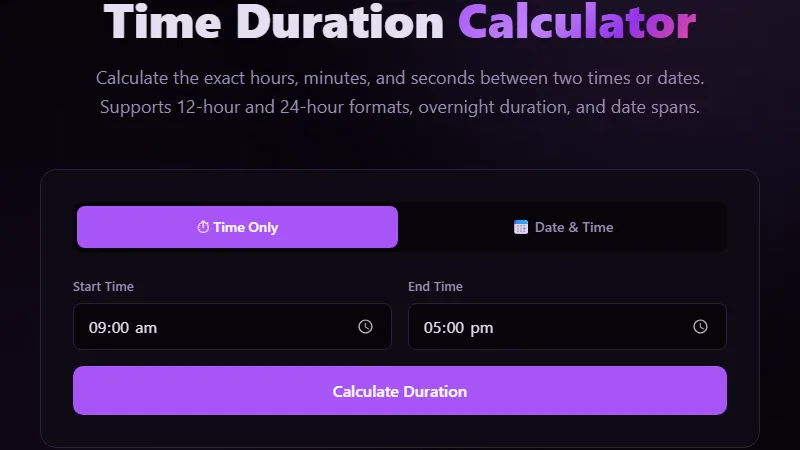
Enter the start time and end time in either 12-hour or 24-hour format. If the end time is earlier than the start time, the tool assumes you mean the next day (overnight). If you select different dates, it calculates the span across days. The tool handles inputs like "11:30 PM" and "23:30" interchangeably. The output shows the duration in hours and minutes, total minutes, and decimal hours. For payroll use, the decimal output is what you record.
Input: Start 22:15, End 06:45 (next day).
Duration: 8 hours 30 minutes.
Decimal hours: 8.50 hours.
Total minutes: 510 minutes.
The overnight flag ensures the tool adds 24 hours to the end time before subtracting.
Payroll Accuracy with Decimal Hours
Most payroll systems require decimal hours because multiplication is cleaner. An employee earning $22/hour who works 37 hours and 45 minutes is owed 37.75 x 22 = $830.50. Converting 45 minutes to decimal means dividing by 60: 45/60 = 0.75. Common payroll round-offs: 15 minutes = 0.25, 30 minutes = 0.50, 45 minutes = 0.75. The tool does this conversion automatically. If your company rounds to the nearest quarter-hour (common under FLSA), you can take the decimal output and round to the nearest 0.25. For example, 8 hours 22 minutes = 8.37 decimal, which rounds to 8.25 if your employer rounds down, or 8.50 if they round to the nearest quarter.
Project Tracking Across Days and Weeks
Freelancers and project managers track time across multiple days. A task started at 2:00 PM on Monday and completed at 11:30 AM on Wednesday is 45.5 hours (not 21.5, which is what you'd get by only looking at clock times). The tool's date-aware mode handles this. Enter Monday's date with 2:00 PM and Wednesday's date with 11:30 AM, and the result factors in the full 24-hour cycles between. This is essential for accurate client billing. Many freelancers undercharge by 10-15% because they miscalculate multi-day durations, especially when a task spans a weekend. The tool shows the exact hours: 45 hours 30 minutes, or 45.50 decimal hours.
Limitations
The tool calculates elapsed time but doesn't account for time zone differences. If you enter "2:00 PM" without specifying a time zone, the tool treats both times as being in the same zone. For cross-time-zone calculations, convert one time to the other's zone first using a time zone converter. The tool also doesn't handle recurring intervals or complex schedules with multiple breaks — it's designed for a single start-to-end calculation. Daylight saving time transitions are not detected; a 7-hour shift on a clock-change night might actually be 6 or 8 hours in real elapsed time. For payroll in regions with DST, consult your labor department's guidance on handling the spring-forward and fall-back days.
FAQ
Does the tool work for negative durations?
Yes — if the end time is before the start time without a date change, the tool treats it as an overnight span. If you actually want a negative duration (for example, showing time remaining until a deadline), the tool returns a positive overnight result instead. To get negative values, use the date fields to force the correct order.
How do I calculate duration between times on different dates?
Use the date pickers. Select the start date and time, then the end date and time. The tool subtracts the full timestamps, accounting for all 24-hour cycles between them. This is the most accurate way to handle multi-day durations.
What is decimal time and why use it?
Decimal time expresses hours as a decimal number instead of hours and minutes. 1 hour 30 minutes = 1.5 hours. It's standard in payroll because multiplying a decimal by an hourly rate is simpler than converting minutes. For example, 40.25 hours x $30 = $1,207.50 vs converting 15 minutes manually.
Can I use this for tracking a workout or cooking timer?
Yes — the tool works for any elapsed time scenario. A 45-minute workout from 6:00 AM to 6:45 AM, or a 3-hour slow-cook recipe from 9:15 AM to 12:15 PM. The output formats (hours:minutes, decimal, total minutes) let you use the data for logs or spreadsheets.
What does "across midnight" mean?
It means the duration spans the boundary between two calendar days. For example, from 11:30 PM to 1:15 AM. The tool detects this because the end hour is smaller than the start hour (1 < 23 when comparing 24-hour values) and automatically adds 24 hours to the end time before computing the difference.
Conclusion
Use this tool whenever you need the exact elapsed time between two moments — for payroll, project tracking, time logging, or personal scheduling. It's most valuable when the span crosses midnight, spans multiple days, or needs decimal-hour output. Don't use it for time zone conversions (use a time zone planner instead) or for calculating dates far in the past or future without a specific time attached — for that, the date difference calculator is more appropriate. The tool assumes a single continuous duration; for split shifts or breaks, calculate each segment separately and add them.
For date-based spans like calculating tenure or age, the date difference calculator provides day-month-year precision, and the exact age calculator breaks it down to seconds for milestone events.
← Back to Blog