Password Strength — How Entropy and Length Beat Complexity Every Time
What It Solves
The most common question about passwords is deceptively simple: is this one good enough? Most people answer by feel. A password that looks complicated — mixed case, a symbol or two, a number tacked on the end — feels strong. But feeling is not measurement. The problem is that the patterns humans use to construct "complicated" passwords are the same patterns cracking tools are built to exploit. "Summer2024!" looks solid but takes seconds to break because the structure (season + year + exclamation) is in every cracking dictionary. What's needed is a way to evaluate a password based on measurable properties: length, character set size, and the resulting entropy. That's what this approach gives you.
The Real Problem
The real problem is a gap in perception. Password strength meters on most sites reinforce bad intuitions. They reward you for adding a symbol and punish you for omitting one, even when a 30-character lowercase passphrase is objectively stronger than a 10-character mix of everything. The meter on your phone's lock screen, the one on your email provider's change-password page — they all use simplistic rules that miss the point. The actual threat is an offline brute-force or dictionary attack against a stolen hash. Attackers don't care whether you used an uppercase letter. They care about the size of the search space. Length is the single biggest factor because every additional character multiplies the search space exponentially. A 6-character random password has 36 bits of entropy. A 12-character one has 71 bits. That difference represents billions of years of cracking time, not seconds.
How to Use It
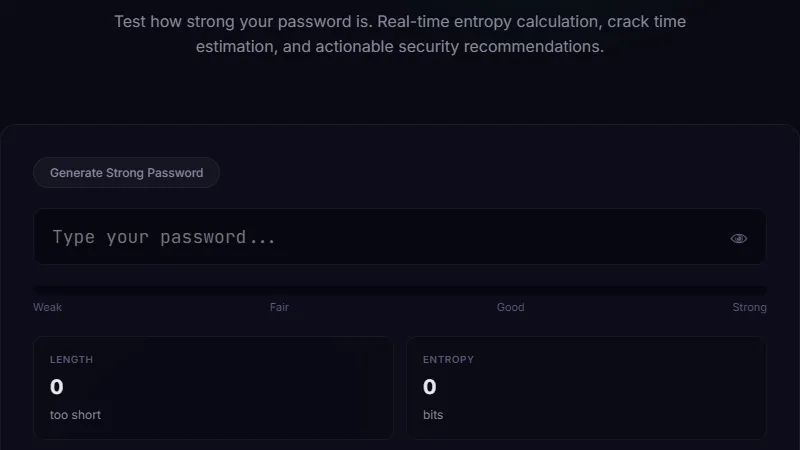
Open the checker and start typing. The interface shows a score, an estimated crack time, a list of character types detected and missing, and — most importantly — the entropy value in bits. Every additional bit doubles the time required to crack the password, so small increases at the high end have outsized impact. The checker uses a local dictionary of common passwords, patterns, and keyboard walks (like "qwerty" or "1qaz2wsx") that it tests before running the entropy calculation. This prevents long but predictable strings from getting falsely high scores.
Walkthrough
Type "iloveyou". The score drops to red. Crack time: instant. The dictionary caught it immediately. Add "123" — still instant. Now try "my cat is named pepperoni" — 23 characters, no capitals, no digits, no symbols. The score jumps to green. Estimated crack time: hundreds of centuries. Entropy: approximately 74 bits. The key insight is that the passphrase is easy to remember, easy to type, and takes longer to crack than a 12-character random string with every character type. This is the practical sweet spot for most people.
When Length Trumps Every Other Rule
This is the most practical use case for the approach. Suppose you manage access for a small team. You can enforce a password policy that requires 14 characters minimum with no composition rules (no mandatory uppercase, symbol, or digit), or you can enforce 8 characters with all four types required. The 14-character policy produces better real-world security because users will choose passphrases they can remember, rather than writing down "Tr0ub4dor&3" on a sticky note. The team adoption rate for passphrase policies is higher, the support ticket volume for reset requests drops, and the actual security posture improves. A company that switched from 8-char-complex to 14-char-no-composition reported a 40 percent reduction in password reset calls and zero increase in account compromises over two years.
Checking Your Master Password
If you use a password manager, your master password is the single most important secret you own. It protects everything else. Many people use a password they think is strong — something like "Guitar1987!" — and never verify it. Running that through the checker reveals about 38 bits of entropy and a crack time measured in hours on consumer GPU hardware. A six-word diceware passphrase like "correct horse battery staple prism glow" pushes entropy past 78 bits and crack time into the millions of years. The checker also includes a generator that creates cryptographically random passwords using the full printable ASCII set. The generator runs entirely in the browser, so nothing is sent to any server. Use it to generate a new master password or individual site passwords that you store in your manager.
Limitations
The checker runs entirely client-side. That means it can see your password as you type, but no data ever leaves your machine. This is both a feature and a limitation. It cannot check your password against online breach databases. After you settle on a password, verify it against Have I Been Pwned separately. The crack time estimates assume a single modern GPU performing an offline attack. Real attackers may have botnets or cloud GPU clusters, so treat the crack time as an optimistic upper bound. The entropy calculation assumes the attacker does not know your generation pattern. If you use a predictable template like "wordYYYY!" and an attacker knows your pattern, the real entropy is much lower than the tool reports.
FAQ
How many characters should my password be?
For anything sensitive, aim for at least 14 characters. For master passwords, 20 or more. Every additional character adds log2(character set size) bits of entropy, so each extra character roughly doubles (or more) the cracking difficulty.
Are passphrases actually better than random strings?
For memorability, yes. For raw strength, a random 16-character string beats a 4-word passphrase, but most people can't remember "Xk9$mP2!qR7#vL1z". A 5-word passphrase is easier to remember and still strong enough for any practical purpose.
Does the tool store my password?
No. Everything runs in your browser. The page does not make network requests, set cookies, or store anything in local storage. The password exists only in memory until you close the tab.
What about password managers generating passwords?
Use them. The built-in generator creates 16-character random passwords, which is fine for most sites. But for your master password, use a diceware passphrase that you can remember without writing down.
Does 2FA make password strength less important?
No. Two-factor authentication protects against remote login attacks, but if the server's password database is stolen, the attacker can crack the hashes offline. Your password must stand on its own regardless of 2FA.
Conclusion
Use this approach when creating a new password, auditing your existing ones, or explaining security to someone who thinks "P@ssw0rd1" is strong. Do not treat the crack time estimate as a guarantee — it is a rough comparison tool. Cross-reference with breach databases, use a password manager, generate random passwords for individual sites, and enable 2FA. The most valuable function of the checker is educational: it makes the abstract concept of entropy concrete and gives you a number you can act on. When the number is below 60 bits, your password needs work. Above 80 bits, you are safe against any practical offline attack for the foreseeable future.
If you work with encoded credentials or authentication tokens, the Base64 encoder and URL encoder are useful companions for handling API keys and secure URL parameters.
← Back to Blog