How to Use Discord Timestamps — A Practical Guide to Never Mistaking Time Zones Again
The Annoyance It Removes
You post "Movie night at 8 PM" in a Discord server and immediately get three replies: "what timezone?" "is that EST?" "for me that's 2 AM." The conversation derails. You waste five minutes clarifying times when what you really wanted was for everyone to see the time in their own local zone automatically. Discord timestamps solve this with a single line of text that renders differently for every viewer.
The problem isn't that people live in different places. It's that Discord has no built-in timezone picker when you type a message. The timestamp codes are the workaround — a markup trick that turns a Unix epoch number into a dynamic time display. Once you know how to write them, you never have to translate time zones manually again.
The Real-World Frustration
Sarah runs a gaming community with members in the US, UK, Australia, and Brazil. Every event announcement needs six different time labels. She used to type "8 PM EST / 1 AM GMT / 11 AM AEST" and so on. The messages were messy, someone always misread their line, and daylight saving shifts broke the translations twice a year.
She switched to Discord timestamps. Now she types a single code and everyone sees the time in their own timezone. The announcement is cleaner, no one shows up an hour early or late, and she stopped fielding "what time is that for me?" questions. The only problem was remembering the format codes — which is exactly what the generator tool solves.
How the Format Works
A Discord timestamp is written as <t:UNIX_TIMESTAMP:FORMAT>. The Unix timestamp is the number of seconds since January 1, 1970 UTC. The format letter controls how it displays. For example, <t:1716844800:F> renders as "Thursday, May 25, 2026 4:00 PM" for someone in Eastern Time, but "Friday, May 26, 2026 6:00 AM" for someone in Sydney.
There are seven format options. t shows a short time like "4:00 PM". T shows a long time like "4:00:00 PM". d shows a short date like "05/25/2026". D shows a long date like "May 25, 2026". f combines date and time short: "May 25, 2026 4:00 PM". F is the full version with the day of the week: "Thursday, May 25, 2026 4:00 PM". R shows a relative time like "2 hours ago" or "in 3 days".
<t:1716844800:F> produces: Thursday, May 25, 2026 4:00 PM.The code
<t:1716844800:R> produces: in 3 days.Both update automatically based on when you're reading this and where you are.
How to Use the Generator
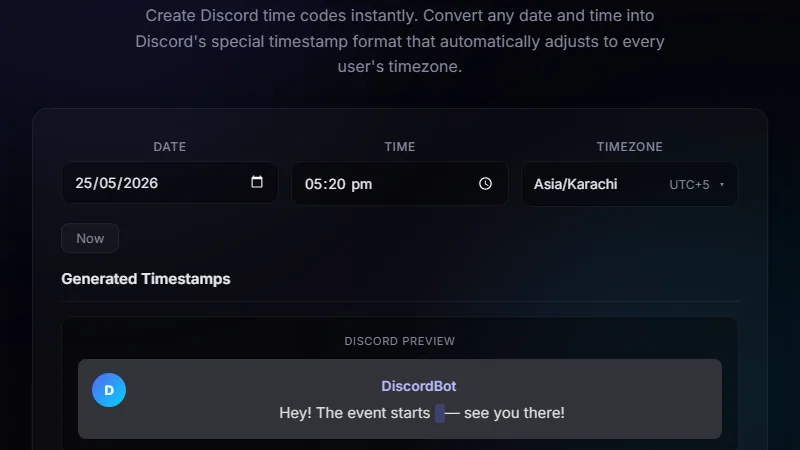
Open the Discord timestamp generator. Pick a date and time using the date picker — or select "Now" to use the current moment. Pick your timezone from the dropdown so the tool knows which zone your event is in. Choose one of the seven format styles. The tool instantly generates the correct <t:...> code and shows a live preview of how it will look in Discord. Click the code to copy it, paste it into your Discord message, and you're done.
If you need a countdown-style display, use the R (relative) format. It shows "in 2 hours" or "in 5 days" and updates in real time as the moment approaches. This is especially useful for raid start times, stream announcements, or deadline reminders where you want people to feel the urgency.
Walkthrough
Say you want to announce a podcast recording on June 1, 2026 at 3 PM Eastern. Open the tool. Set the date to June 1, 2026. Set the time to 15:00. Set the timezone to America/New_York. Pick format F (full date with weekday and time). The tool outputs <t:1717196400:F>. Copy that, paste it into your Discord announcement. Someone in Los Angeles sees "Monday, June 1, 2026 12:00 PM." Someone in Berlin sees "Monday, June 1, 2026 9:00 PM." No manual conversion needed.
Scheduling Events Across Multiple Time Zones
This is the most common use case. A community manager posts a weekly game night. Instead of listing six timezone conversions in the message, they use a single timestamp with the F format. Everyone sees the accurate local time. The key is to set the tool to your timezone — the timezone of the event origin — not the viewer's. Discord handles the conversion on the viewer's side automatically.
For events that repeat weekly, the timestamp points to a specific calendar date. You'll need to generate a new timestamp each week if the event recurs. Some communities work around this by scheduling through Discord's built-in events feature instead, which also uses timestamps under the hood.
Countdown Reminders and Deadlines
The R format transforms a static date into a live countdown. Post "Giveaway ends <t:1717459200:R>" and members see "Giveaway ends in 7 days" on day one and "Giveaway ends in 1 hour" on the final day. It creates urgency without needing a bot. This works well for limited-time offers, submission deadlines, or any event where you want the time pressure to build naturally.
The relative format updates automatically inside Discord's client. You don't need to refresh or edit the message. The tool lets you preview what the relative text will read at the current moment so you can check your math before posting.
Limitations
Discord timestamps only work inside Discord. If you copy the code to Twitter, email, or a web forum, it shows the raw markup text — not a formatted time. The timestamps also rely on the viewer's device clock and Discord's timezone detection, which is usually accurate but can fail on VPNs or misconfigured systems.
You can't embed timestamps in message embeds or inside code blocks — they render as plain text there. And there's no way to make a timestamp "recurring." Each timestamp points to one specific Unix epoch value. If your event is "every Tuesday at 8 PM," you either generate a new timestamp each week or use Discord's event system.
FAQ
Do I need a bot to use timestamps?
No. Timestamps are a native Discord feature. Any user can paste a <t:...> code in any channel and it renders automatically. No bot permissions required.
Which format should I use for most event announcements?
Use F (full date with weekday). It shows the day name, full date, and time — enough context for anyone to understand without clicking. Save R for countdowns and t for quick reminders where the date is already known.
What happens when daylight saving time changes?
Discord timestamps are based on Unix time (UTC), so they're DST-safe. The displayed time shifts automatically for viewers whose regions observe DST. The timestamp itself never needs editing.
Can I use timestamps in thread titles or forum posts?
Yes. Timestamps work anywhere Discord renders markdown — channel messages, thread starter messages, forum posts, and even bio fields. They don't work in channel names, nicknames, or embed titles.
Is there a way to test a timestamp before posting?
The generator tool shows a live preview of how each format renders. You can also paste the code into a private channel or a DM to yourself to see it in the actual Discord UI before sharing.
Conclusion
Use Discord timestamps any time you announce a time-sensitive event in a server with members across multiple time zones. It saves your community the cognitive overhead of timezone math and keeps your announcements clean. The generator tool removes the friction of remembering the syntax and calculating Unix time.
Don't use timestamps for messages outside Discord, for recurring events without a fixed date, or in situations where you need the time to be visible in an embed preview. For those cases, spell out the time explicitly or use a dedicated scheduling bot.
← Back to Blog