Cron Expressions Made Simple — Writing and Testing Scheduled Tasks
What It Eliminates
You need a job to run every weekday at 3:15 PM. You type 15 3 * * 1-5 into your crontab and cross your fingers. Then you wait until Monday to see if it works. If it doesn't, you fix it and wait another day. Cron syntax is compact but unforgiving — one wrong character and your job runs at the wrong time or never runs at all. The expression builder removes the guesswork by showing you exactly when your expression will fire.
The Real Problem
Cron experts make it look easy, but the syntax has tripwires for everyone else. The five fields — minute, hour, day of month, month, day of week — seem straightforward until you try to schedule something like "every 15 minutes during business hours on the last day of the month." The */15 step syntax, the L and W special characters (in some implementations), and the interaction between day-of-month and day-of-week fields are a common source of bugs.
A developer once set 0 0 * * 0 meaning "every Sunday at midnight." But without the right flags, this could also mean "every day at midnight in December" depending on how the cron daemon interprets the wildcard day-of-month field. The builder catches these ambiguities by enumerating the next execution times instead of relying on the developer's mental model.
How the Builder Works
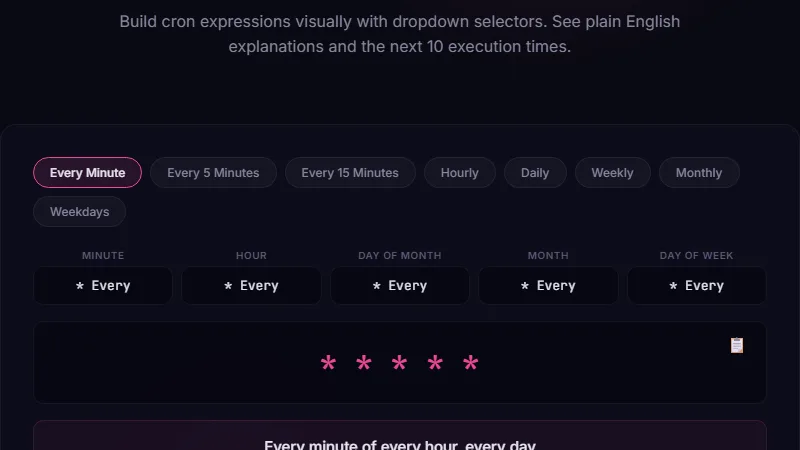
Open the cron expression builder. You can either type an expression directly or use the visual form to build it field by field. The form has dropdowns and number inputs for minute, hour, day, month, and weekday. Each field supports the standard cron features: exact values (5), ranges (1-5), steps (*/10), lists (1,3,5), and wildcards (*).
As you build, a table below shows the next 10 execution times based on the current date and time. This is the killer feature. You don't need to mentally trace through the fields — you see the actual dates and times the job will run. If you meant "every Tuesday" but the table shows Monday dates, you know immediately you got the weekday field wrong.
Expression:
0 */6 * * *Next runs: 00:00, 06:00, 12:00, 18:00, then 00:00 next day.
Common mistake: Writing
* */6 * * * (with a wildcard minute) — this runs every minute during every 6-hour window. 1,440 runs instead of 4 per day.
Debugging a Misbehaving Scheduled Task
Maria has a cron job that sends a weekly report every Friday at 9 AM. The expression 0 9 * * 5 should work. But the report sends on Thursday. She pastes the expression into the builder. The next-execution table shows the next run is Thursday at 9 AM. That's because some cron implementations number weekdays from 0 (Sunday), so 5 = Friday in some systems and 5 = Thursday in others (0=Sunday, 5=Thursday). The builder catches this and shows the weekday mapping clearly. In her system, Friday is 5 in some and 6 in others. She switches to using weekday names: 0 9 * * FRI — which the builder supports.
Without the builder, she would have edited, saved, and waited days to test each permutation. With it, she confirms the fix in seconds.
Scheduling Automated Maintenance on Multiple Servers
An operations team manages 50 servers, each with its own cron jobs for log rotation, database backups, and cache clearing. The jobs need to run at staggered times to avoid overwhelming shared resources. Instead of manually calculating offsets, they use the builder to generate expressions that distribute the load. Server 1 runs at 0 3 * * *, server 2 at 15 3 * * *, server 3 at 30 3 * * *, and so on. The builder's table confirms none of these times overlap with the primary backup window at 2 AM.
The builder also supports non-standard cron extensions like @yearly, @monthly, @weekly, @daily, and @hourly. These are useful for quick scheduling without remembering the base expression syntax.
Limitations
The builder uses the standard 5-field cron format (minute, hour, day of month, month, day of week). It does not support the 6-field variant with seconds (used by Quartz Scheduler) or the 7-field variant with year. For Quartz expressions, you need a specialized tool that extends the field set to include seconds and years.
The tool also doesn't account for the cron daemon's specific behavior around edge cases like DST transitions. A job scheduled at 2:30 AM on a day when clocks spring forward to 3 AM simply won't run. The builder shows the scheduled UTC times but can't predict whether your system's cron daemon will handle the transition gracefully.
FAQ
What's the difference between 0 0 1 * * and 0 0 1 * 0?
The first runs at midnight on the 1st of every month. The second also runs at midnight on the 1st AND every Sunday. When both day-of-month and day-of-week are specified (not wildcards), the job runs when EITHER condition matches, not both. This is a common source of unexpected extra runs.
How do I make a job run on the last day of the month?
Standard cron doesn't have "last day of month" built in. Use 0 0 28-31 * * with a shell script that checks if tomorrow is the 1st. Some cron implementations support L in the day-of-month field, but this is not universal. The builder supports the standard syntax only.
Does the tool support @reboot?
No. @reboot is a special string for jobs that run once at system startup. Since it doesn't have a time-based schedule, the builder can't show next-run times for it. Use @reboot directly in your crontab.
Can I use MON-FRI instead of 1-5?
Yes. The builder accepts three-letter weekday abbreviations (SUN, MON, etc.) in addition to numeric values. Month abbreviations (JAN-DEC) are also accepted. This makes expressions more readable.
Why does the table show more than 5 runs for some expressions?
The table shows the next 10 execution times. For expressions that run frequently (like every minute), this covers only the near future. For monthly expressions, it may span nearly a year. Ten is an arbitrary limit that balances usefulness with readability.
Conclusion
Use the expression builder any time you write a cron expression that isn't trivially simple. If it takes you more than 10 seconds to mentally verify the expression, the builder will catch mistakes faster than trial and error. It's especially valuable for expressions involving steps (*/...), multiple ranges, or combined day-of-month and day-of-week constraints.
Don't use it for one-off @daily or @hourly shortcuts — those are simple enough to type directly. Also skip it if your scheduler uses a non-standard syntax like Quartz or AWS EventBridge's rate expressions, which have different field semantics.