Color Codes Demystified — HEX, RGB, HSL, and CMYK Explained
The Confusion It Resolves
There are at least five ways to represent the exact same color: #6A0DAD (HEX), rgb(106, 13, 173) (RGB), hsl(275, 86%, 36%) (HSL), hsv(275, 92%, 68%) (HSV), and cmyk(39%, 92%, 0%, 32%) (CMYK). They all describe the same purple, but each uses a different model. A designer working in CSS needs HEX. A printer asks for CMYK. A data visualization engineer tweaks HSL for perceptual brightness. The problem is that nobody memorizes conversions between these formats — and manual conversion is error-prone. The color converter handles all these formats simultaneously, showing you every representation of any color you pick or enter.
The Real Problem
Different industries and tools use different color models for valid historical and technical reasons. HEX is the web standard because it's compact — six hex digits represent 16.7 million colors. RGB is the additive color model used by screens: red, green, and blue lights mix to produce every pixel. HSL (hue, saturation, lightness) was designed for human intuition: instead of "mix 106 red with 13 green and 173 blue," you say "purple at 86% saturation and 36% lightness." HSV (hue, saturation, value) is similar but uses value (brightness) instead of lightness, which maps better to how artists think about color. CMYK is subtractive — used by printers that start with white paper and subtract cyan, magenta, yellow, and black inks. A brand guide specifies a color in one model, but you need it in another. A client sends you a HEX code but your design tool expects RGB. A print vendor asks for CMYK values but you only have the web color. The converter bridges all these gaps instantly.
How to Use the Tool
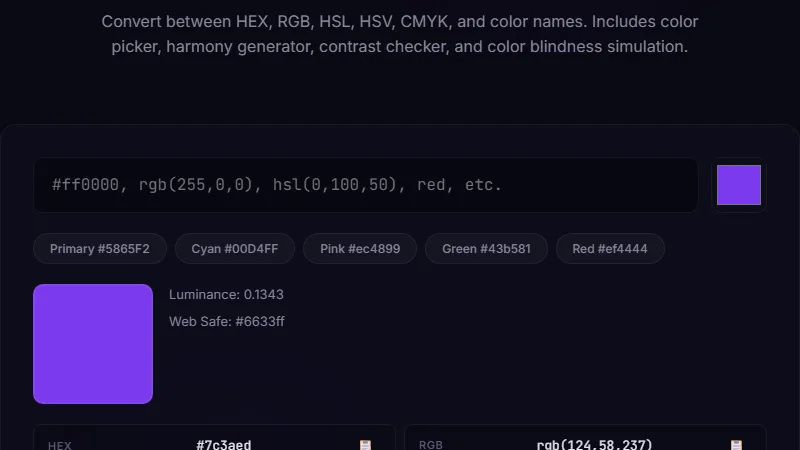
Open the color converter. You can pick a color using the visual color picker, paste a HEX code like #FF5733, type RGB values like rgb(255, 87, 51), or enter HSL/HSV/CMYK values. The tool immediately shows you the color swatch and all its representations across every format. A contrast checker shows whether the color works as text on white or black backgrounds, using the WCAG AA and AAA standards. The color blindness simulator shows how the color appears to someone with protanopia, deuteranopia, or tritanopia. A palette section suggests complementary, analogous, and triadic colors based on your selected hue.
RGB: rgb(255, 107, 53)
HSL: hsl(16, 100%, 60%)
HSV: hsv(16, 79%, 100%)
CMYK: cmyk(0%, 58%, 79%, 0%)
Contrast on white: AA for large text, fails for small text.
Complementary color: #3585FF (a cool blue).
The tool shows all this in real-time as you adjust the color picker.
Matching Brand Colors Across Web and Print
A marketing manager receives a brand guide that specifies the primary color as CMYK: C=0, M=100, Y=100, K=0 (pure red). The web team needs a HEX code for the website. The printer uses the CMYK value directly, but the web team needs to convert it accurately. Entering the CMYK values into the converter gives the HEX equivalent: #FF0000. But here's the catch — CMYK-to-RGB conversion isn't perfect because the color gamuts differ. Some CMYK colors can't be reproduced on screen, and vice versa. The converter shows you the closest screen equivalent and flags colors that are out of gamut. For this reason, brand guides often provide all format values explicitly. When they don't, the converter gives you a reliable starting point that you can verify against a physical color swatch. The color blindness simulator is also critical for brand work — choosing colors that are distinguishable for all users avoids accessibility lawsuits and ensures your brand is inclusive.
Data Visualization and UI Design with HSL
Data visualization designers love HSL because it makes color scheme generation mathematical. To create a sequential color scale for a heatmap, you fix the hue (say, blue at 210 degrees) and vary the lightness from 90% (light) to 30% (dark). To create a diverging scale, you use two hues on opposite sides of the color wheel (red at 0 degrees and blue at 210 degrees) and blend through the middle. HSL makes this trivial because hue, saturation, and lightness are independent sliders. RGB can't do this as intuitively — changing a color's brightness in RGB requires adjusting all three channels. The converter's HSL mode lets you experiment: pick a base color, then generate lighter and darker variants by adjusting lightness while keeping the same hue. This is how UI design systems build their color tokens (primary-50 through primary-900). The contrast checker validates that your lightest and darkest variants still meet readability standards. For accessibility, use at least AA contrast (4.5:1 for normal text, 3:1 for large text) across all tokens in your system.
Limitations
The converter shows the closest possible conversion between color models, but perfect conversion isn't always possible. CMYK has a smaller gamut than RGB — some bright screen colors can't be printed. The tool flags these. Monitor calibration affects how colors appear on your screen — the converter can't control your hardware. The color blindness simulator is an approximation based on standard mathematical models (Brettel, Viénot, and Mollon) and may not match every individual's experience. The tool does not support Pantone, RAL, or other proprietary color matching systems. The contrast checker uses the WCAG 2.1 relative luminance formula, which is the current standard but doesn't account for all visual impairments.
FAQ
Which color format should I use for CSS?
HEX is the most common and most compact. HSL is gaining popularity because it's easier to create color variants programmatically. RGB is standard and well-supported. Any format works in modern CSS — choose based on your workflow. Most design tools export HEX by default.
Why do my screen colors look different when printed?
Screens use RGB (additive color, emits light) and printers use CMYK (subtractive color, absorbs light). The two color spaces have different gamuts. Bright colors on screen, especially neon tones, often can't be reproduced in print. Always convert your brand colors to CMYK and proof them on your specific printer before a production run.
What does the contrast ratio number mean?
WCAG 2.1 defines three levels: AA requires 4.5:1 for normal text and 3:1 for large text (18px+ bold or 24px+ regular). AAA requires 7:1 for normal text and 4.5:1 for large text. The ratio compares the relative luminance of the text and background colors. A ratio of 21:1 is black on white, 1:1 is identical colors.
How do I find the complementary color of my brand color?
In HSL, complementary colors are 180 degrees apart on the color wheel. The converter's palette section shows complementary, analogous, and triadic colors automatically. For a blue brand color at hue 210, the complement is orange at hue 30. Use complements sparingly for accents and calls to action.
Can I convert a photo's color palette using this tool?
The tool works with individual color values, not images. To extract a palette from a photo, use an image color extractor first, then enter each extracted color into the converter to get its values in every format. Many design tools can extract a 5-color palette from any image.
Conclusion
Use the color converter whenever you need to translate a color between formats for web development, print design, or data visualization. It's most valuable when switching between screen and print workflows, building design systems with HSL color tokens, or verifying brand color consistency across formats. Don't use it for batch processing multiple colors (enter them one at a time), for Pantone or proprietary color matching, or for extracting palettes from images. For related visual tools, the paint calculator helps estimate how much paint you need for physical color projects, and the square footage calculator helps measure the spaces you're designing for.
For more encoding and conversion tools, check out the Base64 encoder decoder and the URL encoder decoder.
← Back to Blog