Understanding API Rate Limits — How to Calculate Headroom and Avoid 429s
The Pain It Addresses
You build an integration with a public API. It works in testing. You deploy to production. Your requests start returning 429 Too Many Requests. Your application grinds to a halt. You check the documentation and find a rate limit of 1,000 requests per hour — but you're only making 200 requests per hour. How are you hitting the limit? The answer is usually that you're sharing a rate limit pool with other services, or the limit is calculated on a rolling window, or your burst rate exceeds the per-second cap even though your hourly total is fine.
Rate limit math looks simple on paper but fails in practice because the dimensions are multi-layered: requests per second, per minute, per hour, per endpoint, per API key, and sometimes per IP address. Missing one of these layers produces the 429 error. The rate limit calculator lets you model your actual usage against the documented limits to find the weak point before it blocks you.
The Real Scenario
A SaaS company integrates with Stripe's API for payment processing, customer management, and invoice generation. Stripe's rate limits are generous but apply per API key across all services. The company has three services hitting the same API key: the billing service (peaks at 500 requests/hour), the customer dashboard (200 requests/hour), and a batch reconciliation job that runs hourly (400 requests in 5 minutes). The total across all three is 1,100 requests/hour — under Stripe's documented limit of 5,000 requests/hour for their tier.
But the reconciliation job's burst of 400 requests in 5 minutes equals 80 requests/minute, which exceeds Stripe's undocumented burst cap of 60 requests/minute. The 429s start. With the rate limit calculator, they model each service's traffic pattern, discover the burst violation, and add a 200ms delay between reconciliation requests to spread them across 10 minutes instead of 5.
How the Calculator Works
Open the API rate limit calculator. Enter your API tier's documented limits — typically requests per second, per minute, and per hour. Then add each service or endpoint that consumes from that pool, specifying its average request rate and peak burst rate. The tool calculates the combined utilization across each time window and highlights any window where you exceed the limit.
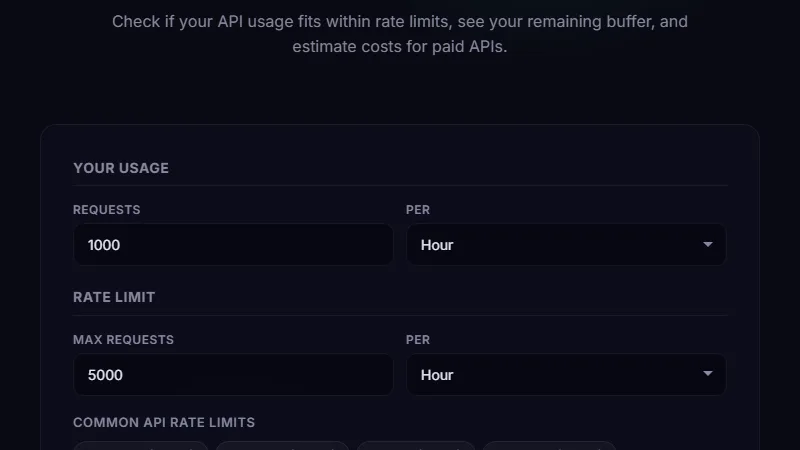
The output shows three key metrics: headroom (how much capacity remains), bottleneck (which time window constrains you most), and time-to-block (how long until you hit the limit at current rates). You can adjust parameters and see the impact immediately — reducing one service's burst rate by 20% might free up 50% headroom if that service was the bottleneck.
Service A: 3 req/s average, burst 8 req/s.
Service B: 2 req/s average, burst 5 req/s.
Service C: 1 req/s average, burst 3 req/s.
Total average: 6 req/s (60% headroom).
Combined burst: 16 req/s — exceeds 10 req/s limit. The per-second window is the bottleneck.
Choosing the Right API Tier Before You Commit
When evaluating API providers, the tier pricing usually scales with rate limits. The basic tier might cost $50/month for 1,000 req/hr. The pro tier costs $200/month for 10,000 req/hr. The calculator helps you decide which tier to choose by modeling your expected traffic against each tier's limits. If your average usage is 800 req/hr with bursts to 2,000 req/hr, the basic tier fails on burst. You need the pro tier or you need to implement queuing.
The tool also factors in growth. If you're growing at 10% month-over-month, you can see how many months until you exceed each tier. A common mistake is choosing a tier based on current usage without modeling growth, then hitting limits three months later and scrambling to migrate.
Limitations
The calculator models rate limits based on the parameters you provide. It doesn't have access to actual API response headers like X-RateLimit-Remaining or Retry-After. Those headers give real-time visibility into your current limit state, while the calculator gives a planning-time estimate. Use both — the calculator for capacity planning, response headers for operational monitoring.
Some APIs use complex rate limiting strategies like token bucket algorithms, sliding windows, or concurrency limits (max parallel connections) in addition to rate limits. The calculator handles the simple fixed-window and sliding-window models but can't simulate token bucket dynamics without knowing the bucket size and refill rate. Check your provider's documentation for the algorithm type and adjust your inputs accordingly.
FAQ
What's the difference between rate limiting and throttling?
Rate limiting rejects requests that exceed a threshold (HTTP 429). Throttling slows down requests to stay within the limit, usually by adding latency. The calculator helps you avoid both scenarios by keeping your request rate under the documented limits.
How do I calculate headroom when I have multiple API keys?
Treat each API key as a separate pool. Calculate the headroom for each key individually. If you can distribute services across keys, the calculator can model the split and show whether separating keys improves overall capacity.
What's a safe headroom percentage?
20-30% headroom is comfortable for most production services. Below 10%, a small traffic spike triggers 429s. Above 50%, you might be overpaying for your tier. Adjust based on your traffic volatility — bursty traffic needs more headroom than steady traffic.
Does the tool handle concurrent connection limits?
No. Some APIs limit the number of simultaneous connections, which is different from request rate. Connection limits depend on how long each request takes and whether you use connection pooling. The calculator handles request rates only.
Can I model retry logic in the calculator?
Indirectly. If you add a retry multiplier to your request rate input (e.g., enter 1,200 req/hr instead of 1,000 if you expect 20% retries), the calculator includes retry traffic in the headroom calculation. It's a manual adjustment but gives a more realistic picture.
Conclusion
Use the rate limit calculator during API integration planning, before selecting a pricing tier, or when debugging 429 errors. It turns the abstract "we're within limits" assumption into specific numbers you can act on. The most valuable use is identifying which time window (per-second, per-minute, or per-hour) is your binding constraint, because fixing the wrong one wastes time.
Don't use it as a real-time monitoring tool — that's what API response headers and observability platforms are for. Also skip it for APIs with no documented limits or for internal services where you control the server-side rate limiting.
? Back to Blog